Responsive Ads Here
Showing posts with label WORDPRESS. Show all posts

Friday, November 17, 2017

5 Steps To Creating Online Gaming Website On Wordpress

There is nobody who don’t like to play. Nowadays, playing online games becomes very popular. Most of the persons want to play games without downloading. Because of it, they are finding a website that has the online gaming advantage. Numerious people and kids are addicted in playing game in online. That’s why today, I’m going to show you 5 steps to creating online gaming website on the popular blogging platform Wordpress.
Online Gaming

Online Gaming Website in 5 Steps

Just 5 steps I mentioned below, needed to create a online gaming website in wordpress. First, have a look on these and then see in details. After that, try to execute all the steps and finally get a money making online gaming website.
  • Domain Name
  • Purchase Wordpress Hosting
  • Upload Wordpress Gaming Theme
  • SEO
  • How to Monitize Online Gaming Website

Domain Name

To launch a any kind of website or blog, you must have to owned a domain name. It may be free or paid. But, here you will get a top level domain name freely. Top level domains are .com, .org, .net and .info etc. Any types of domain can be used to make a website but the top level domains should be preferred because these have some advantages like google usually rank these domains easily. So, at the step no. 1 just select your domain name according to your keyword and move to the second step because you’ll get a top level domain free if you perform the second step.

Purchase Wordpress Hosting

Hosting is the place where your website data will be kept. So, you have to buy hosting. As Wordpress is your website platform, you have to buy wordpress hosting. Wordpress is one of the most popular CMS(Content Management System) and this is usable in multi-purpose. Another reason this platform is cheap, easy to use and user-friendly. So purchase any package ofwordpress hosting from the below link. The shared package just charge $3.95/mon. It’s really cheap than others.


If you can’t understand what you have to do in the next step to buy hosting, read the article “How to buy wordpress hosting? In this article I have shown all the steps in pictures. So this will be very helpful to you. A domain name will be given freely, when you completed your hosting purchase.

Upload Wordpress Gaming Theme

After the purchase of domain and hosting, wordpress software needed to install on your new blog. Here have a look on “How to Install Wordpress” to complete the step. Some essential settings needed to setup after the installation. A beautiful wordpress gaming theme is given below. Download and install it on your blog. This theme name is Blackfyre. As a starting of an online gaming website, this theme is the perfect for you. Because have a  look on this features and properties in below.

Features and properties
  • Multi-player support
  • Community building advantage
  • Establish clans
  • Full admin control
  • SEO responsive
  • User-friendly
  • Unlimited colors
  • 24 hour support
  • Cross browser compatible
  • Animated design
  • Woocommerce support
  • Ads ready
  • Beautiful layout

Online Gaming


SEO

Now you have website where people can play games in online. Think, how people will find your blog? Of course, google! But your website has just launched and google don’t know yet about this. So, now your task is to make google understand about your new website. That’s why, you have to do SEO. Here a complete guide on how to do seo. Follow the below article.


How to Monitize Online Gaming Website

So now, you have a website and it has some daily visitors and you want to make money with it. Yeah, this is possible and very easy task. Here mind that, it’ll would be very difficult if your website had no daily traffic. Two ways to make money from a blog. The easiest way is ads showing. A company will give you ad codes , you just have to place the codes in your website and the ads will be seen. Your website will start to making money. Here are some popular ads company. Apply to get their codes.

  • Google Adsense
  • Media.net
  • Revenuehits
  • Bidvertiser
  • Chitika

Over to you
Creating online gaming website is really a easy task like other website making process. It will be very fast to be successful, whether you can do all the steps perfectly. Best of luck for your online gaming website. If you like this article please share it on your social media and leave a comment in below.

5 Best Wordpress Themes 2018 [Responsive and SEO Optimized]

Here are 5 best wordpress themes for the new year 2018. All the themes are free. Just download and install the theme on your wordpress blog. At the starting of the new year 2018, make your wordpress blog more SEO responsive and professional by installing one theme from the list of best wordpress themes.
best wordpress themes

Best Wordpress Themes 2018

People are searching best wordpress themes to make their wordpress blog more advanced in 2018. If you are the one of them, you are at the right place. Today, I am going to share 5 best wordpress templates for the new year 2018.

1. OnePage Lite

OnePage Lite Free WordPress Theme is designed specially for wordpress blogs. It has a landing page outlook which makes a simple blog more professional. Stylish homepage, beautiful design, two strategic call-to-action buttons and full SEO features including social share advantages all are ready in this theme.

Features
  • Latest Version 1.0.2
  • Compatible with Wordpress 4.0-4.8.3
  • Full SEO Responsive
  • Widget Ready
  • Multilanguage Support
  • One Click Installation Advantage
  • Unlimited Theme Colors
  • Ads Ready


2. Schema Lite

Schema Lite Free Wordpress Theme is one of the most using theme on wordpress platform. This theme is higly flexible in different devices. It always ready to fit with any device. And the most interesting is that its free version contains almost all the advantages which are available in its premium version.

Features
  • Full SEO Ready
  • SEO Responsive
  • Highly Flexible
  • Fit Power With All Devices
  • High Speed Loading
  • Latest Version 1.0.6
  • Compatible With Wordpress 4.0-4.8.3
  • Wdget Ready
  • Multilanguage Support
  • Ads Ready


3. Point

Point Free Wordpress Theme is one of the most widely used theme. It takes place in the list of best wordpress theems because of its simple but important properties. It has a beautiful slider to concern the visitors at a first look.

Features
  • Latest Version 2.0.4
  • Compatible With All Versions of Wordpress
  • SEO Ready
  • User friendly
  • High Speed Loading
  • Simple Look Working Great
  • Ads Ready


4. DualShock

DualShock Free Wordpress Theme is unique in its font style. This theme is very user friendly, easy readable and fast loading. Have a look on its features.

Features
  • SEO Responsive
  • Fast Loading
  • Easy Readable Fonts
  • Beautiful Layout
  • Widget Ready
  • Ads Ready
  • Unlimited Colors
  • User Friendly
  • All Device Compatibility


5. Bloggie

Bloggie Free Wordpress Theme is the best for wordpress blog sites. It has beautiful a sidebar where popular posts and recent posts wait for visitors concern. Fonts are very clear and easy readable of this theme.

Features
  • SEO Ready
  • User Friendly
  • All Device Compatibility
  • High Speed Loading
  • Ads Ready
  • Easy Readable Fonts
  • Beautiful Sidebar
  • Latest Version 1.0.6
  • Compatible With All Versions of Wordpress


Over to You
Install any from the best wordpress themes I mentioned above and make your blog successful in the new year 2018. If you like this post, please share it on your social media.
If you have a blog on blogger, don’t worry here I mentioned best bloggers themes also. To choose and install the best blogger template click on Top 5 Free Blogger Templates 2018.

Thursday, April 27, 2017

Liquid Web Reviews - Best Dedicated Hosting

Liquid Web is one of the best dedicated hosting and VPS server hosting situated in USA. They offers dedicated hosting service in a proper rate and better service. Let's check out the reasons why Liquid Web is the best dedicated hosting to their clients.


Are you running a business that needs a best dedicated hosting to satisfy your clients more?

Are you finding a VPS server hosting provider which can satisfy you?
 -  Yes, you are in the right place. Let’s know an answer of a short but most important question.

Is Liquid Web the best for dedicated hosting service?
 -  Undoubtly

Is it’s price is proper than others according to their service?
 - Proper charge for better service.


#1. Liquid Web Reviews

Something important about it

Liquid Web was stublished on 1997. Now it’s providing their service to more than 30,000 clients worldwide included the remarkable names ESPN, Motorola, United Way, Red Bull and so many.

It’s headquartered in Lansing, Michigan, USA. Their additional data centers are in Chicago, Dallas Amsterdam, Phoenix etc.

No shared hosting – Only specialized in VPS and Dedicated hosting

Liquid Web doesn’t provide shared hosting now. Because they are really dedicated in their VPS server hosting and Dedicated hosting service. Numerious famous companies and individuals who are running businesses use this hosting provider to host their property ( Website, Blog, Forum etc.) and to run their business perfectly.

Leaving shared hosting business they have concentrated more on this VPS server hosting and Dedicated hosting business. That’s why, in a survey it scored 5/5.

#2. Managed WordPress Hosting

It’s an advanced WordPress hosting for running blogs, websites. It’s fully managed. Unlike others WordPress hosting providers, it’s not usual. It’s more effective and more hassle free. It’s more speedy and more secure. So, it can be a great choice for your WordPress website.

#3. Performance

- Definitely the best

A clear conception of performance can be found about this hosting provider after seeing the famous names like Motorola, ESPN who are their trusted client. So, no doubt it’s performance is really great. And it’s awesome performance made it best dedicated hosting service provider.

#4. Online support and Customer care

Liquid Web offers 24x7 online support to their clients. They are promised to take special care for their customers. A dedicated team is always ready to take phone calls and chat in live. They answer to solve any problem in a minute. In fact, they are very specialized, friendly and expert in related area.

#5. Uptime Guarantee

Liquid Web offers 100% uptime guarantee for all packages and clients. They offer 30 minutes replacement guarantee for dedicated server customers. If problem arises, they are bound to replace it in 30 minutes.

#6. Secure Service

Security is the main issue of their client’s safety. Undoubtly, they are one of the best secure hosting service provider. They offers SSL, malware scanning, Virtual Private Networks (VPN) and Firewalls etc for their customers. They also offer backup and so many security services for securing their clients property.

#7. Expensive But Powerful Web Host

Seeing it’s price, Liquid Web looks like an expensive. But it’s sevice is better ever. Comparing with others, it’s price is proper and it’s hosting service is better than others. Because, you know

Product Quality = Price Quantity

#8. The Bottom Line

So, gathering all the informations about Liquid Web hosting provider, should I choose it?
  • Definitely, you can choose it.
Because, it’s a powerful, hassle-free, secure, user friendly and reliable dedicated and VPS web hosting service provider. It’s really the best dedicated hosting ever.

Tuesday, March 14, 2017

HostGator 3 Days Special Sale [75% OFF + 2.99$ on Select Domains]

The globally well-known web hosting company HostGator offers a new discount for new web hosting. Those who are willing to buy a new web hosting, HostGator should be your best choice at this time. HostGator offers 75% discount on new web hosting and only charge 2.99$ on select domains. It’s a great enjoying that, you can choose top level domains (.com, .org, .net etc) in the same rate.


#1. Why should you sign up right now:

•  75% OFF from regular price
•  Only 2.99$ on top level domains
•  Free SSL
•  24x7 Customer support
•  100% Secure

NB: This offer is only available for 3 days.

  • Start Date   :   Tuesday, March 14th at 12:00am CT.

  • End Date     :   Thursday March 16th at 11:59pm CT.

Saturday, January 28, 2017

9 Best Web Hosting In 2018 Which Are Also Cheap

As the new year 2018 has just started its journey, some hosting providers offer cheap web hosting packages to make happy new bloggers. In fact, the hosting providers offer various amount of discounts to make their hosting service cheap in the new year. Today, I’m going to share these discounts. Although almost all companies have offered their discounts for the new year, I’m going to recommended you some of them considering their reliability. So, let’s start…

#9 Best Web Hosting Companies in 2018 - You Should Consider to Host
best web hosting 2018


#1. BlueHost

BlueHost is one of the most reliable and cheap web hosting provider around the world. Here read the inside on BlueHost Review to know the reason why BlueHost is the best web hosting for you. For the new year 2018, it also declared a great discount for their customers. In the last year, they charged 5.95$/month but for the new year 2018, they charge only 3.95$/month after offering the discount where their real charge is 7.99$/month. You’ll get more offers if you buy their hosting at this time. Let’s see these all…
  • A free top level domain
  • Free website builders
  • 1-Click WordPress installation
  • Dedicated support 24 hours
  • 30-day money back guarantee
 

Most wondering is that you are going to get a new top level domain (.com) totally free with your hosting. It’s really cheap web hosting at this time which is limited. Only you’ll get this offer if you buy this from below link. So, what are you waiting for! Click on the below link to buy instantly.


After buying the hosting package you like, see all the steps here in pictures to install WordPress on BlueHost.

#2. DreamHost

DramHost is a re-known cheap web hosting service provider company which is reliable for their good service. They also offer some discounts for the new year. But the awesome thing is that they offer now 97days money back guarantee if you are satisfied with their service. So, you must be satisfied their service cause it’s really outstanding. Let’s see more about what you’ll get after purchase…
  • Shared hosting only at 7.95$/month
  • DreamPress only at 16.95$/month
  • DreamPress hosting is 5 times faster-shared hosting
  • 97 days money back guarantee
  • 1-Click WordPress installation
  • 24 hours dedicated support


Another one offer they declared if you want to pay annually them, you’ll get 15% discount from their regular price. So, stop thinking and be the lucky customer within a limited time discount. Just sign up from this link to get all these.

#3. CrucialHost

CrucialHost may be considered quite expensive to you cause its charge is higher than other hosting providers. But it’s not actually not like that if you consider it’s service along with its charge.

Interesting thing is that I offer a coupon code containing 30% off. Using this coupon if you buy this hosting right now, you’ll get this awesome service at a pretty low price. So don’t be late guy…


Use this coupon code: TECHNETGR to get this discount.

CrucialHosting has two types of hosting service.
  • Shared Hosting
  • Dedicated Hosting

They offer 50% discount for the first month. So they’ll charge you only 5$/month after giving the discount where their real charge is 10$/month. To get this discount use this coupon code: SAVE50


If you choose dedicated hosting plan, they usually charge 150$/month. But using this promo code: SAVE50 you’ll get 50% discount. So your first month charge will be 75$/month.


#4. A2Hosting

A2Hosting is a Michigan-based hosting provider company in the USA. It’s hosting service is also reliable worldwide. They offer some discounts also to customers for the new year. You’ll get a top level domain free.


Their charge only 3.92$/month for the new year. To get this discount use this coupon code: flash51


#5. Inmotion Hosting

Inmotion Hosting offers you a great hosting package in only at 2.95$/month after the 57% discount. Just go to the below link and choose Business Hosting.


Have a look at their other hosting packages. Buy any from here.

#6 . iPage Hosting

iPage offers a big amount of discount 72% in the new year. After the discount, they only charge 3.25$/month where their previous charge was 11.95$/month. So it’s really a cheap web hosting. It’ll be better to you.


They also offer 30days money back guarantee if you’re not satisfied with their service.

#7. SiteGround Hosting

SiteGround is also a well-known hosting service provider. They only charge 3.95$/month for web hosting package. Let’s have a look at their packages.

Choose any one package a and buy from the below link to get a discount.


#8. Cloudways Hosting


Cloudways, a well-known managed web hosting company seen on reliable tech giants like WordPress, VentureBeat, PCMag and Review Signal etc. Cloudways manged hosting can be one of the best option for the beginners because it doesn’t require credit card to sign up and it offers conditionless trial. So, if you are thinking to start a new website, you should choose Cloudways without any hesitation. This awesome hosting platform works perfectly in all businesses like Blogging, Eecommerce, Digital Agencies, Startups etc.


#7 Reasons Make Bound to Purchase

  • No Credit Card Require
  • Sign Up for Free
  • Unlimited Applications
  • Free Migration
  • Pay as you go
  • 24x7 Customer Support
  • Conditionless starting offer

Plans and Pricing of Cloudways Hosting:


#9. HostGator Hosting
HostGator, one of the most using hosting service provider for small businesses guaranteed three basic things to the customers. These are 24x7x365 customer support, 45 day money back guarantee and 99% uptime. HostGator has been awarded for its outstanding service from the stublished giant customers like WpBegineer, PCMag etc. It’s a award winning hosting service company based on USA that is reliable. All the plans are nice for service for different purposes. It charges less but works great.

#5 Reasons Make Bound to Purchase
  • Easy and Affordable
  • 24x7x365 Customer Support
  • Perfect uptime speed
  • User satisfaction guaranteed
  • 45 Days money back guarantee

 Plans and Pricing of Hostgator Hosting:

Sunday, December 11, 2016

Send Mail From Free Custom Domain Email Using Gmail

A Free custom domain email will be given by the hosting provider according to your custom domain at the time of buying it. It’s your site’s email which can be used to connect with your site’s subscribers. So, it plays an important role to get your site rank by helping. But you have to use it in free email service platforms like Gmail, Outlook etc. So before start using, you have to link this free custom domain email with any free email. Today, I am going to show you the whole process step by step.
free custom domain email


#How To Send Mail From Free Custom Domain Email

1. First, Login to your "cPanel".
free custom domain email

2. Click on “Email Accounts” from the dashboard.

free custom domain email

3. Choose username in the first blank bar and choose a password in the next two. Then click on “Create Account”. Yes! Your custom email has been created.

free custom domain email


4. Login to your Gmail account in which you want to setup your custom domain email address. Actually, we are going to create another mail service in this Gmail to send and receive mail .

free custom domain email

5. Go to the top-right and click on “Settings” icon, some options will appear. From these, click again on “Settings”.

6. Then click on “Accounts and Import” from the tab bar.

free custom domain email

7. From this window, click on “ Add a mail account”.

free custom domain email

8. A pop-up window will open containing a blank bar in the middle. Here you have to type your custom domain email address. And, then click on “Next step”.


9. A new window will appear again. In this window, your custom domain email address which you’ve created a few minutes ago, input in the “Username” area and custom domain email password in the “Password” area. Input the hosting homepage URL ( follow this format:  www.hostinghompage.com) in the “POP Server area”. Then, check the boxes like following screenshot and click on “Add account”. Here mind it, if you choose SSL security option placed in below, you have to choose port 465. Otherwise, choose the other.

free custom domain email

10. A confirmation window will open containing two option. Choose the first option to be able to send mail from this mail. You have to do this cause you are able to receive mail only at this moment. So perform the next step to be able to send mail. After choosing the first option, click on “Next step” to go ahead.

11. Here, type the name what you want to see as sender.


12. A new window will appear like the above one. In this window, type the same URL what you entered into the previous window like this. Of course, same format. And the other options, fill out the same information. That means, enter custom domain email and email password. Here remind that, if you choose SSL security option placed in below, you have to choose port 465. Otherwise, choose the other. After filling out all the information, click on “Add account”.


13. A confirmation code requesting window will be appeared like the below. You can close this window. Mind here, your account is not confirmed yet.


14. To confirm your account, go the cPanal dashboard and Click on “Email Accounts” once again.

15. Click on “More” from the right down of the page. Three options will appear, you have to choose “Access Webmail”.

free custom domain email

16. Click on the “Roundcube” option.

free custom domain email

17. Incoming emails will open. See here, a new email has been reached. Click on this to open.

free custom domain email

18. After opening the email click on the activation link.

free custom domain email

19. Then go back to your gmail and a new mail will be seen in custom domain mail name what you have chosen few minutes before as a sender. Open the mail.

free custom domain email

20. You’ll see the confirmation link again and click on it to execute the whole steps.

free custom domain email

21. A new window will be opened. Click on "Confirm".

free custom domain email

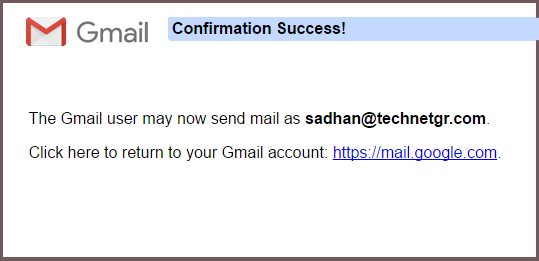
22. You'll be seen the "Confirmation success" message at the end.

free custom domain email

Yes! You have done all the tasks perfectly. Your custom email is ready to send and receive mail. Here mind, when you are going to send an email, you have to select your custom email like the  below screenshot.